
Why I Built ContactContinuity
For more than a decade, I've helped companies get more value from HubSpot through CRM architecture, marketing automation, and Revenue Operations. Through Optimize 3.0, I've also spent years running email marketing campaigns for our own business and our clients.
Working with hundreds of businesses across industries through Optimize 3.0, a HubSpot Diamond Solutions Partner, I kept seeing the same pattern: important customer and prospect email replies contained valuable CRM information that never made it into HubSpot.
Over time, I noticed the same pattern again and again.
Someone would reply:
"I've left the company."
Or:
"Please contact Sarah instead."
Sometimes the person had retired. Sometimes they had changed roles. Sometimes they named a replacement or directed us to a shared mailbox.
The information was valuable.
The problem was what came next.
Here is a typical example. The sender explains that she has left the company, notes that she will temporarily finish pending work, and names the person who should handle future needs. The email contains several important updates that should be reflected in HubSpot—not just a new contact name.
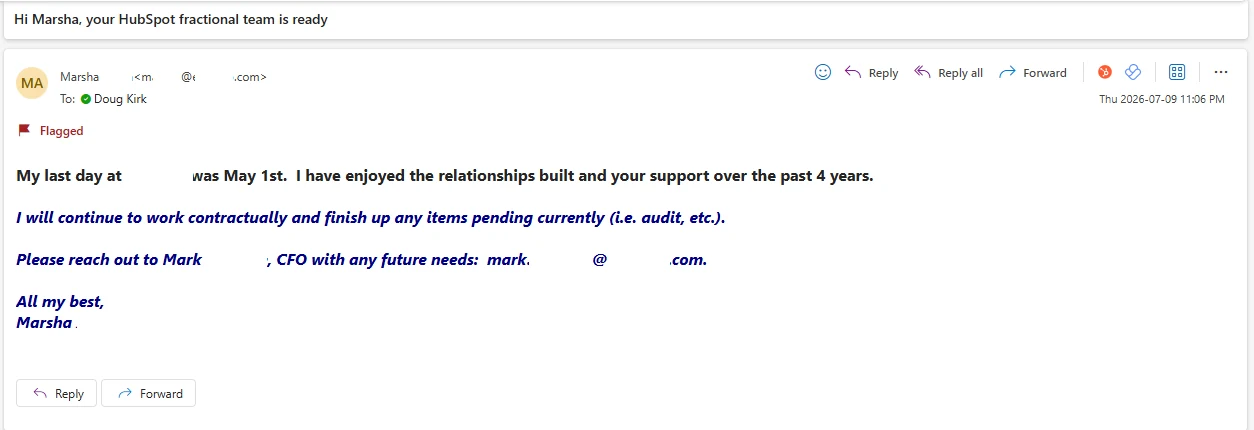
This is exactly the type of email that created the problem for me. It clearly communicates that the original contact has left, that the departure is not entirely immediate, and that a successor has been named. Updating HubSpot correctly requires more than simply editing one contact record.
The CRM Rarely Gets Updated
Every one of these replies meant HubSpot needed attention.
At first, it seemed like a simple contact update. But it quickly became obvious that a single email often triggered a long list of decisions.
- Should the original contact be marked inactive?
- Should they remain a marketing contact?
- Does the replacement already exist in HubSpot?
- Should a new contact be created?
- What happens to workflows, lists, company associations, deal relationships, ownership, notes, and follow-up tasks?
A contact change is rarely just a contact update.
Like many HubSpot users, I'd think:
"I'll update HubSpot later."
Most of the time, later never came.
The inbox contained the latest information. The CRM did not.
Related reading
how ContactContinuity prepares the right HubSpot updatesThe Hidden Cost
This became even more obvious as we sent larger email campaigns and worked with prospecting data from platforms like Apollo and ZoomInfo.
No contact database stays current forever. People leave companies every day.
The replies arriving in our inbox contained exactly the information we needed—but turning those replies into complete HubSpot updates required far too much manual work.
My experience with HubSpot also showed me the downstream impact.
Updating the contact record was only the beginning.
There were marketing contact decisions, workflow enrollment, suppression lists, company and deal associations, ownership, notes, reporting, and relationship history to consider.
Those decisions affect Sales, Marketing, and RevOps—and in some cases, marketing contact costs as well.
Building the Tool I Wanted
I looked for a solution.
I couldn't find one.
So I built ContactContinuity.
The goal wasn't simply to recognize that someone had left a company.
The goal was to understand what should happen next inside HubSpot.
ContactContinuity identifies common situations like a named replacement, retirement, role change, temporary coverage, shared inboxes, or updated contact information, then prepares the appropriate HubSpot recommendations for review.
Related reading
email reply scenarios ContactContinuity handlesNothing changes automatically.
Every recommendation is reviewed and approved before anything is written to HubSpot.
Here is a real example of what that looks like from start to finish.
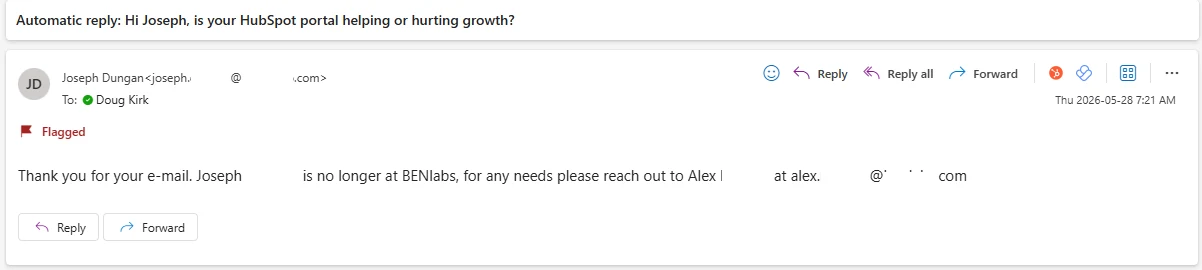
An auto-reply arrives. The contact has left the company. A replacement is named. At a glance it looks like a one-line note—but it contains everything ContactContinuity needs to prepare the right HubSpot updates.
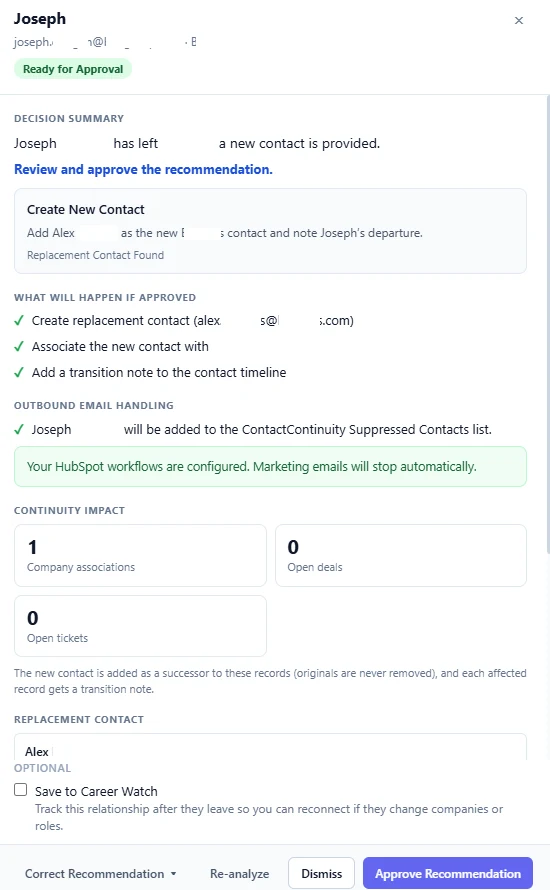
ContactContinuity identifies the departure, finds the named replacement, and prepares a complete recommendation. Before anything touches HubSpot, a reviewer sees exactly what will happen—which contacts are affected, what associations carry over, and how marketing emails will be handled.
When approved, ContactContinuity applies the updates. The replacement contact is created in HubSpot with the right attributes, associations, and a transition note on the activity timeline.
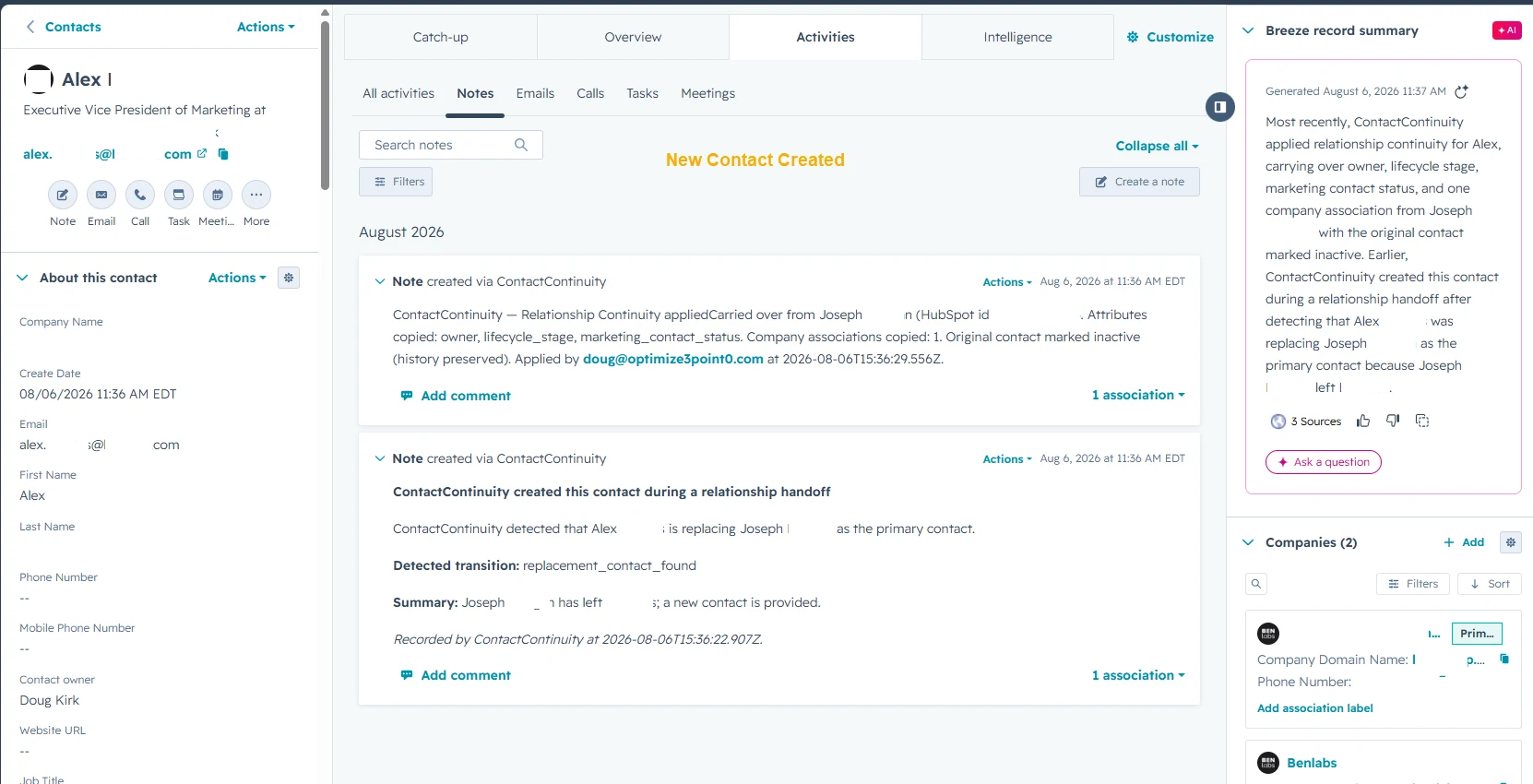
And the original contact's record is updated with a note recording the transition. The history stays intact. Nothing is deleted.
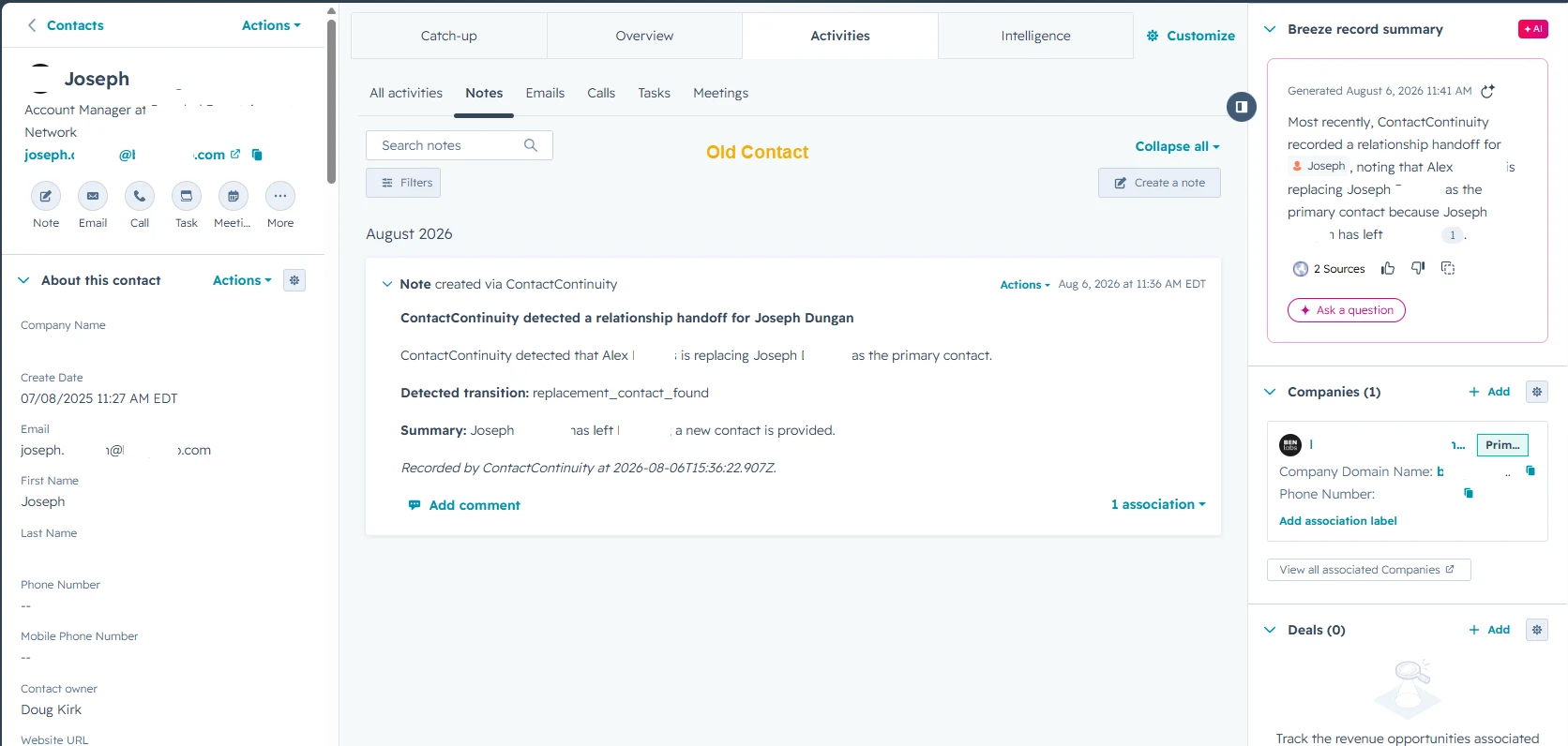
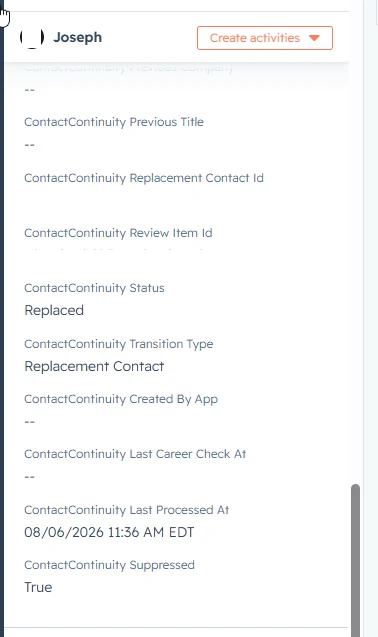
ContactContinuity also handles the outbound email side automatically. The original contact is added to the ContactContinuity Suppressed Contacts list, so future marketing emails stop without anyone touching a list manually.
The ContactContinuity properties on the original contact confirm the full picture in one place.
Built by a HubSpot Partner
The ideas behind ContactContinuity came directly from real client work at Optimize 3.0. After seeing the same contact-change emails appear across hundreds of HubSpot portals, it became clear this wasn't an isolated problem—it was a missing workflow.
That firsthand experience—not theory—shaped every decision in how ContactContinuity reads emails, identifies what changed, and recommends the right HubSpot updates.
The hard part isn't reading the email.
The hard part is understanding everything that should happen inside HubSpot afterward.
That's the problem ContactContinuity solves.
It helps Sales, Marketing, and RevOps keep HubSpot aligned with current business relationships—without manually working through every downstream decision.
Related reading
see exactly what ContactContinuity updates in HubSpotYour Inbox Changes Faster Than Your CRM
People will always change jobs.
Those changes will continue to arrive through email.
The question is whether they stay in the inbox or become accurate HubSpot updates.
I built ContactContinuity because I experienced this problem myself, and I couldn't find a solution that truly understood HubSpot.
Now I can confidently review these emails, approve the right recommendations, and keep HubSpot current.
I believe thousands of other HubSpot teams face the same challenge.
Related Resources
Keep Important Changes From Stopping in Your Inbox
ContactContinuity identifies important contact changes from email replies and recommends the right HubSpot updates—helping Sales, Marketing, and RevOps keep business relationships current.
Request a Demo