
Your inbox changes faster than your CRM.
ContactContinuity is purpose-built for HubSpot to turn important email replies — like “I’ve left the company,” “contact my replacement,” or “this inbox is no longer monitored” — into accurate, reviewable CRM updates.
Those emails contain CRM updates. ContactContinuity makes sure they don’t stop in your inbox.
Nothing is written to HubSpot until an authorized user approves the recommendation.
Works with Microsoft Outlook and Gmail.
Hi,
I'm no longer with Brightfield Partners.
Please direct future correspondence to Maya Patel at m.patel@brightfield.io.
— Tom
Someone on your team reads the email. HubSpot never does.
Every day, important relationship changes arrive in someone's inbox. Most teams intend to update HubSpot later, but a contact change is rarely just a contact update. The result is a CRM that gradually falls behind.
Someone notices the email.
A relationship changes.
Someone reads the email.
Business continues.
HubSpot never learns about the change.
A contact change is rarely just a contact update.
One email can affect:
- Replacement contacts
- Marketing contacts
- Properties
- Workflows
- Associations
- Relationship history
ContactContinuity recommends the right updates.
Rather than simply editing a contact, ContactContinuity prepares a complete set of HubSpot updates — replacement contact, owner, deals, marketing status, and more — ready for your team to review and approve.
Including
- Replacement contact
- Relationship continuity
- Marketing contact updates
- CRM notes
- Follow-up tasks
- Human approval
See ContactContinuity in Action
Every recommended HubSpot update appears in the Relationship Inbox for review before anything is written to HubSpot.
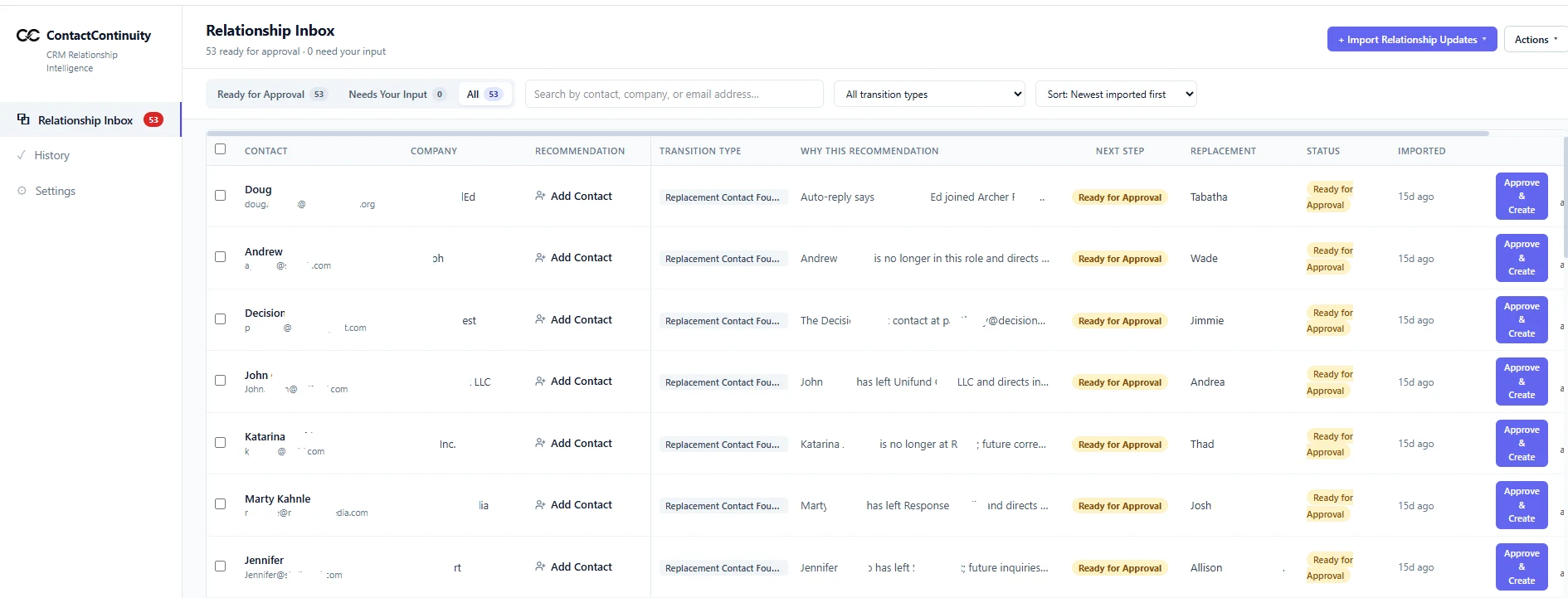
The Relationship Inbox displays every recommended HubSpot update waiting for review and approval.
See why each recommendation was made.
Review the proposed HubSpot updates.
Approve only the changes you want to apply.
ContactContinuity catches relationship changes like these.
These messages arrive every day. They usually get read, filed, and forgotten before the CRM is updated.
"I've left the company."
"John has retired."
"Please contact Sarah going forward."
"I'll be out until October."
"Please use our accounting mailbox."
"David is taking over my territory."
"My email address is changing."
"For future inquiries, contact our client services team."
"Jennifer and Mark will be covering my responsibilities."
"I'm no longer monitoring this inbox."
ContactContinuity identifies what changed, who should take over, and what HubSpot should do next.
Business relationships change in many ways.
Every relationship change is different. ContactContinuity knows the right HubSpot update for each one.
They named their replacement
A contact emailed to introduce the person taking over their accounts. The successor may or may not be in your CRM already.
They left — no successor mentioned
A contact announced their departure with no replacement named. The account needs to be flagged and reassigned.
Someone is covering temporarily
A colleague is filling in while the permanent hire is found. The record needs a temporary owner, not a full contact transfer.
The new person is already in HubSpot
The named successor already exists as a contact. No duplicate is created — the existing record is updated and promoted.
Replies go to a shared inbox
Job-change emails forwarded from a team address (billing@, cs@, accounts@) are routed and attributed correctly.
Responsibilities are being split
Two or more people are taking over different parts of the departed contact's role. Each relationship is handled separately.
Every approved recommendation updates HubSpot the way your team would.
ContactContinuity prepares the CRM changes, your team reviews them, and approved updates are written directly to HubSpot with a complete audit trail.
- Creates the right replacement contact without duplicates
- Keeps the correct owner assigned
- Connects the replacement to the right company
- Preserves relevant deals and tickets
- Marks departed contacts inactive
- Stops future marketing to departed contacts
- Records the relationship change on the contact timeline
- Creates a follow-up task for the owner
- Logs who approved the change and when
Sarah Jenkins
David Chen
You stay in control.
You decide what it sees
Connect only the inboxes you choose. Everything else remains off limits.
Nothing changes without approval
ContactContinuity prepares the recommendation. Your team decides what reaches HubSpot.
Every action is logged
See what changed, who approved it, and when.
Typical Email Replies ContactContinuity Recognizes
Common Questions
Never let important relationship changes stop in your inbox.
Keep HubSpot aligned with your business relationships by reviewing and approving the right CRM updates.